Sewing Machine Not Feeding Fabric? Causes and Easy Fixes
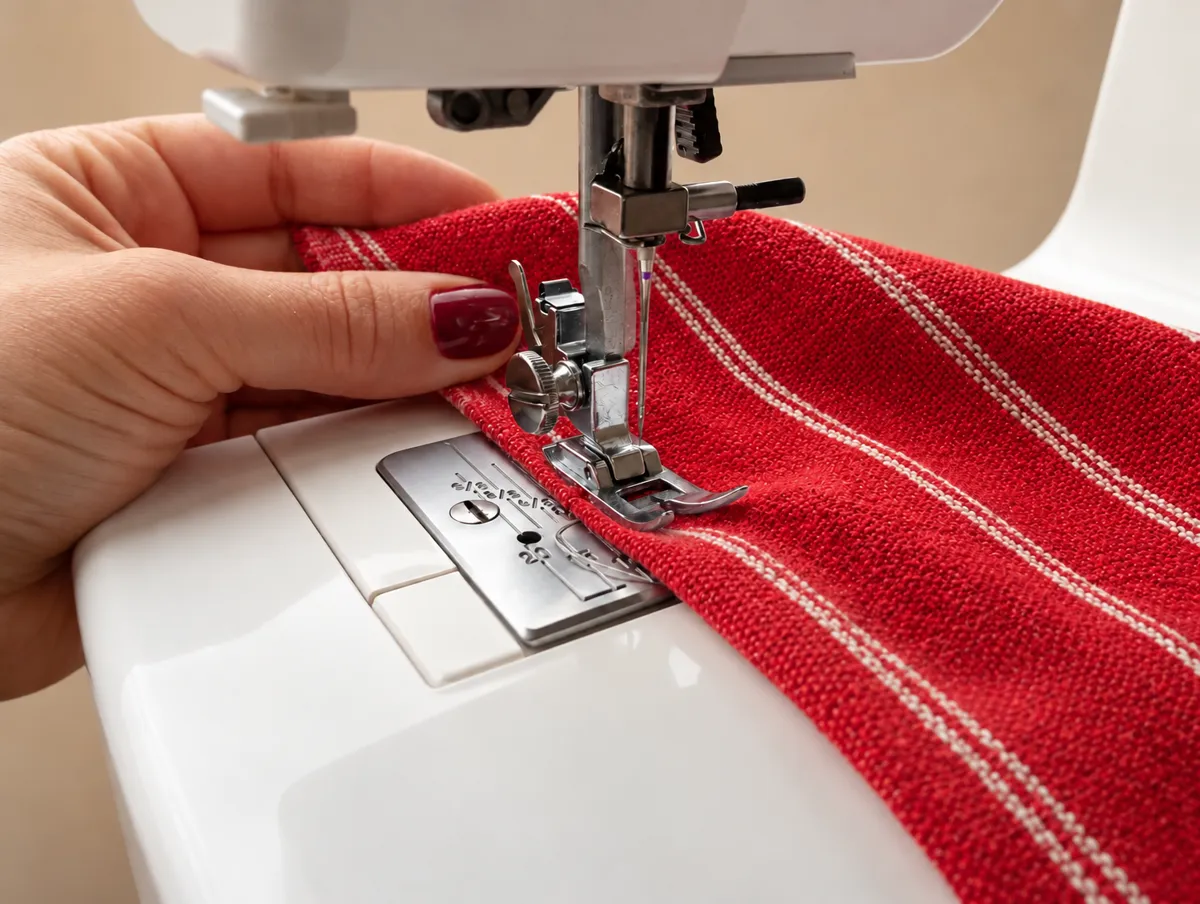
Go to a mechanic if you hear knocking or grinding when you turn the handwheel, or the feed dogs still don’t travel away from you after causes 1–7.
You press the pedal, the needle goes up and down, the motor sounds fine… and the fabric just sits there. Or it moves in jerks or gets swallowed into the needle hole.
In 20 years at the bench I’ve seen this hundreds of times, and in most cases it’s a setting or lint, not a broken machine. When a sewing machine stops feeding fabric, the usual suspects are stitch length set to 0, dropped feed dogs, a presser foot that is up or too light, a thread nest, or lint packed between the teeth. Start at the top and work down.
Switch the machine off and unplug it before you take off the needle plate or put your fingers near the feed dogs.
Fabric not moving, jerking or pulled into the plate? Start here
Find your symptom and jump straight to the likely cause.
First: the 30-second handwheel test
This is the first thing I do when a machine comes in with this problem. Set the stitch length to 2.5 (straight stitch), raise the presser foot, take the fabric out, and slowly turn the handwheel toward you. Watch the feed dogs, the little metal teeth under the foot.
A healthy cycle: the teeth rise above the plate, carry away from you toward the back of the machine, drop below the plate and return toward you. Then:
- Teeth never appear → cause 2 or 8
- Teeth go up and down but barely travel, or don’t travel at all → cause 1 (check the stitch length), then 8
- Teeth move fine but the fabric still doesn’t travel → causes 3–7: presser foot, thread, lint, the fabric itself, needle plate
01Stitch length is set to 0
The most common cause, and the easiest. At length 0 the feed dogs don’t advance the fabric: the needle keeps stitching, but every stitch lands in the same spot and the fabric stays put.

CHECKSet stitch length to 2.5: in the S zone the stitches are so fine that the fabric barely moves. On a computerized machine, re-select the straight stitch: buttonhole, bartack and some decorative stitches set the length close to 0 on their own.
At 2.5 the teeth rise, carry the fabric away from you and drop. At 0 the fabric stays in one spot.
02Feed dogs are dropped (lowered)
Most machines can lower the feed dogs for free-motion quilting and darning. If someone used that, or bumped the feed dog lever, the teeth sit below the plate.
The lever is usually at the back of the machine or under the free arm. On some machines the teeth only come back up after you switch the lever and turn the handwheel one full turn. Older machines may use a cover plate over the teeth instead. If you can’t see the lever, take off the accessory box or extension table: on some machines the lever is hidden under it. Whether your machine has this option, and where exactly the lever is, depends on the model: check your manual or look up your model online.

03Presser foot pressure is too low, or the foot is up or loose
The feed dogs can only move fabric that’s pressed down onto them.
- Foot up. Easy to forget, especially with the presser foot lever half-down. Sewing with the foot up also makes a thread nest underneath.
- Foot not snapped on. Press it on until it clicks; a loose foot rocks and won’t hold.
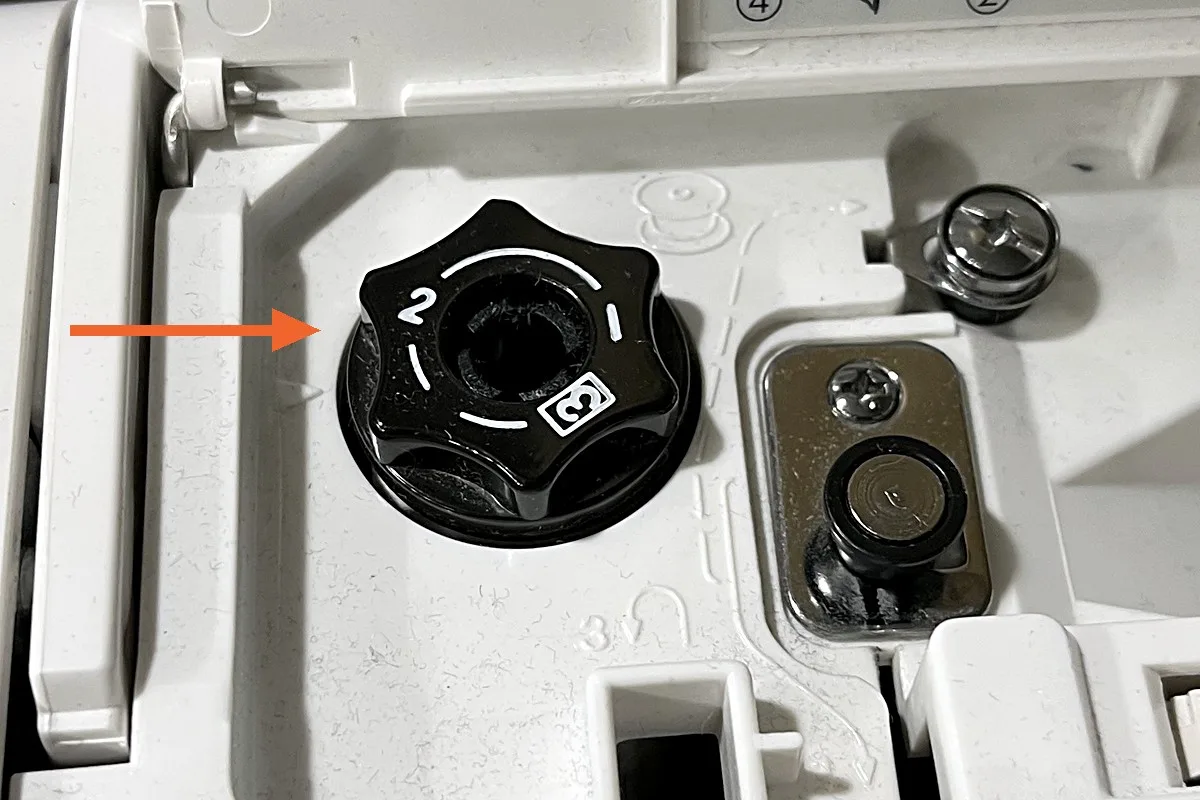
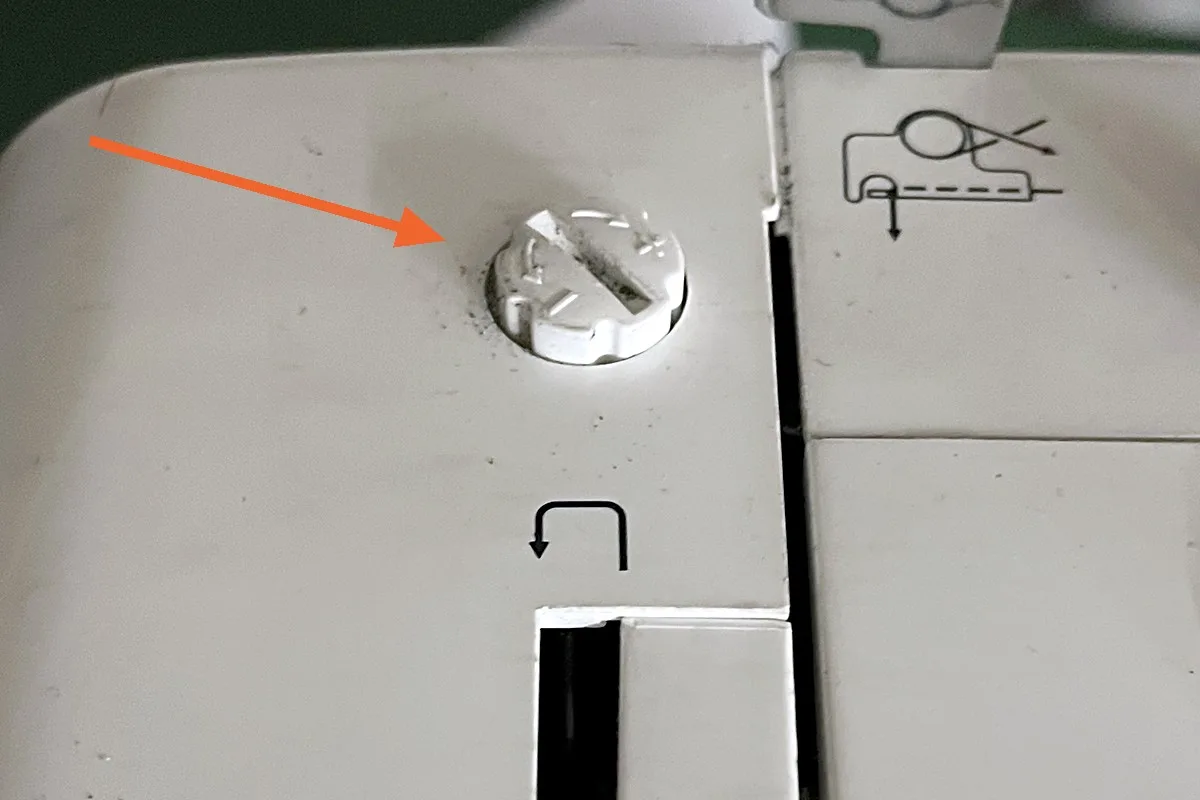
- Pressure too low. If your machine has a pressure dial, check it isn’t on 0 or the darning setting. Too much pressure is a problem too: the fabric gets squeezed and feeds in jerks.
Where the pressure regulator is depends on the machine. It can be a wheel on the top cover, a knob under the lid or a slotted screw on top, so look at the top of the head. These photos are only examples: check your machine’s manual to see how yours looks.

04Thread is jammed under the fabric (bird’s nest)
If the machine stitches in one spot and starts to thump, there’s almost always a thread nest under the fabric holding it like an anchor.

- Stop, switch the machine off and unplug it. Don’t yank the fabric out.
- Raise the presser foot and the needle, cut both threads next to the fabric, lift the fabric away.
- Remove the plate and pick out every bit of thread, including around the hook.
- Rethread the top thread with the presser foot up.
I show how to take off the needle plate and clean the hook area step by step, with photos, in my free Clean & Oil Guide.
Why the nest forms in the first place: Sewing machine making loops underneath.
05Lint is packed between the feed dogs
This is what I find most often on machines that “suddenly” stopped feeding. Lint gets pressed between the teeth and under the plate until it turns into a solid felt pad. The teeth can’t rise high enough to grip.
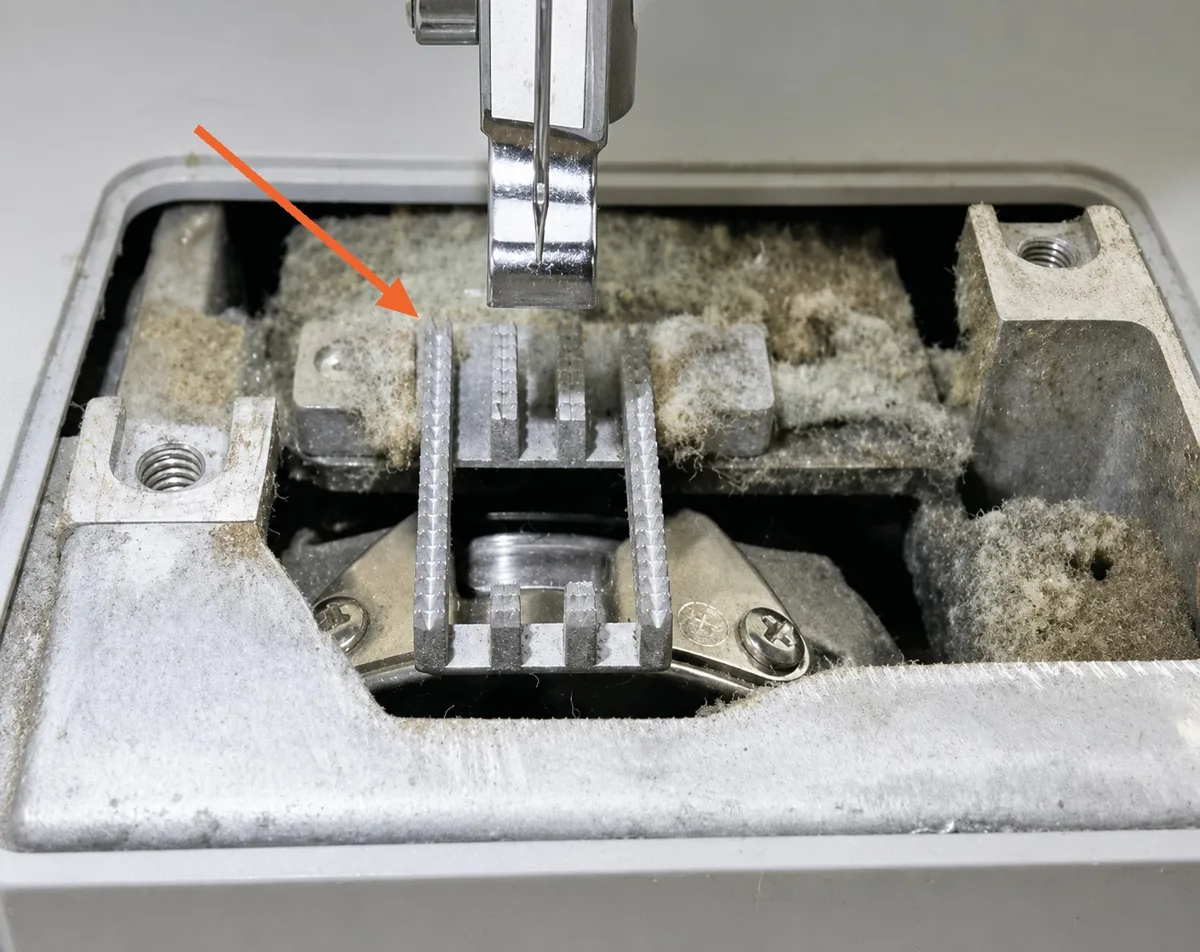
DOUnplug and take off the needle plate: my free guide shows how. Clean between the teeth first: pull the felt out with tweezers, a wooden stick or a brush, then brush out the area under them and wipe the underside of the plate.

Since the needle plate is already off, don’t stop at the teeth. This is a good moment to clean the whole machine and oil it where it needs oil. My free Clean & Oil Guide shows every spot step by step, with photos, for both vertical and horizontal hook machines.
When you’re done, put the plate back and repeat the handwheel test (keep the machine unplugged): do the teeth now rise clearly above the plate?
Free PDF · vertical and horizontal hook
06The fabric itself is fighting the feed
The needle has to suit the fabric: a fine one for chiffon, a denim needle for thick seams, a leather needle for leather and vinyl. How to choose: Why does my sewing machine needle keep breaking?
Thin fabric gets pulled into the hole
Chiffon, silk and thin knits get pushed down into the needle hole at the first stitch. Hold both thread tails for the first 2–3 stitches or start on a small scrap and sew straight onto your fabric. A straight-stitch needle plate helps if your machine has one. You can also put tissue paper under the fabric and tear it away after sewing.
Thick seams stop the foot
At a jeans hem the foot tilts up at the front and stops gripping. At the very start of the seam, slip a piece of cardboard of the same thickness under the foot at the back, just to level it (like in the photo). Never sew over the cardboard and never push it under the needle hole: the needle can break. Go slowly, use the handwheel over the thickest part. A walking foot also helps with thick, slippery or layered fabrics.

Sticky fabric: vinyl, leather, oilcloth
The foot grabs the surface and holds it back. Use a Teflon or roller foot, or put a strip of tissue paper on top and tear it off afterwards.
Your hands just steer. Pulling the fabric from behind or holding it back fights the feed dogs, gives uneven stitches and can bend the needle. Support heavy fabric so it doesn’t hang off the table and pull backwards.
07Damaged needle plate or worn feed dogs
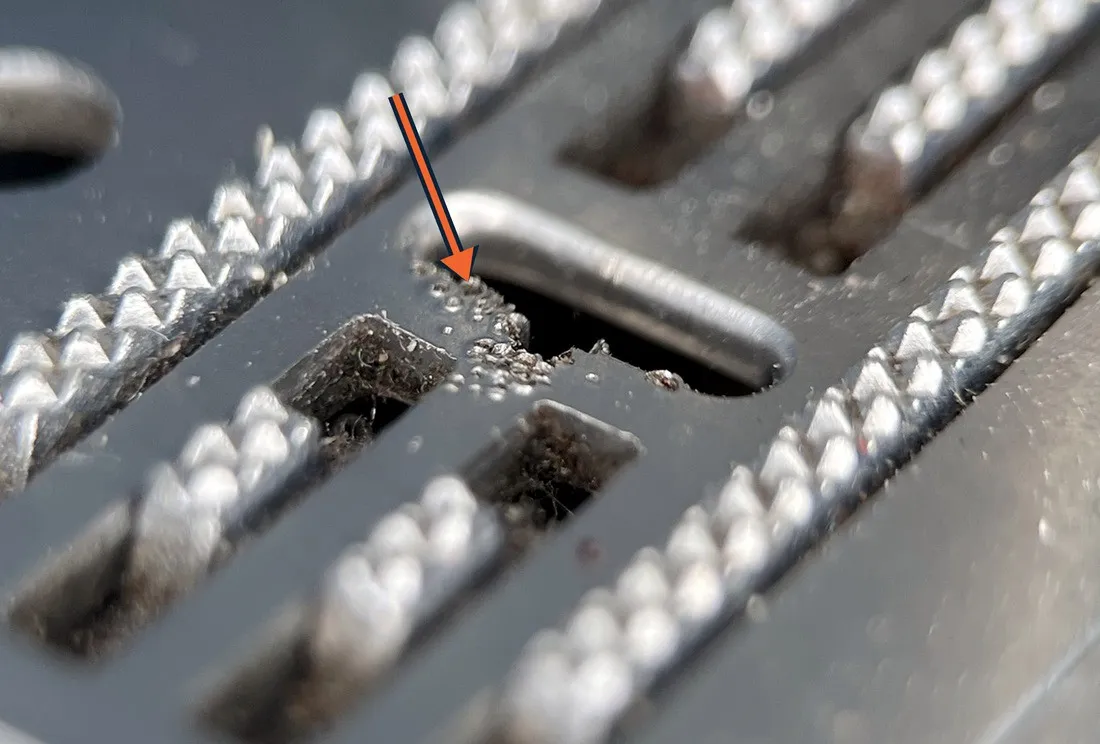
Needle strikes leave burrs around the needle hole and slot. They catch the fabric and make it feed in jerks, often with a light scraping sound. On old, heavily used machines the teeth themselves wear flat and stop gripping.
Run a fingernail around the hole: if it catches, the plate needs polishing or replacing. Replacing a plate is a home job: get the one made for your exact machine model. Polishing is better left to a mechanic.
08The feed mechanism needs a mechanic
If you’ve been through 1–7 and the handwheel test still looks wrong, it’s inside the machine: feed dog height, feed timing, a loose or broken part in the feed drive.
Set the stitch length to 2.5, lift the presser foot, remove the fabric and slowly turn the handwheel toward you. Healthy feed dogs make one full loop: they rise above the plate, travel away from you, drop, and come back toward you. If that loop doesn’t happen, check the signs below.
- Feed dogs go up and down but never travel away from you
- Feed dogs don’t rise even when the feed dog lever is set for normal sewing
- Knocking or grinding when you turn the handwheel
- Needle hits the fabric while it’s still moving, needles bend or break even though you’re not pulling the fabric
- Error code on a computerized machine
This is a repair job, not a settings fix: my Repair Guide (coming soon), or a mechanic.
Quick checklist
- Stitch length 2.5, straight stitch selected
- Feed dogs up (handwheel test)
- Presser foot down, clicked on, pressure not on 0
- No thread nest under the plate
- Lint cleaned out between the teeth
- Right technique for thin, thick or sticky fabric
- No burrs on the needle plate
In my experience, most machines are back to normal by step 5.
Quick answers
Why does my sewing machine needle move but the fabric doesn’t?
The feed dogs aren’t carrying the fabric. Do the 30-second handwheel test: if the teeth rise and travel, look at causes 3–7 (presser foot, thread nest, lint, the fabric itself, the needle plate). If they only go up and down, check the stitch length first and then the mechanic section.
Why is my sewing machine stitching in one place?
Most often the stitch length is set to 0, so every stitch lands in the same spot. On a computerized machine, a buttonhole, bartack or some decorative stitches set the length close to 0 on their own. Set the length to 2.5 and re-select the straight stitch (cause 1). A thread nest under the fabric can also hold it in place (cause 4).
How do I raise the feed dogs?
Find the feed dog lever, usually at the back of the machine or under the free arm, and set it back to normal sewing. On some machines the teeth only come up after you switch the lever and turn the handwheel one full turn. Where the lever is depends on the model, so check your manual (cause 2).
How do I know if my feed dogs are working?
Unplug the machine, set the stitch length to 2.5, raise the presser foot and take the fabric out. Turn the handwheel slowly toward you. Healthy feed dogs make one full loop: they rise above the plate, travel away from you, drop, and come back toward you.
Why does my fabric get pulled into the needle plate hole?
It happens most with thin fabric such as chiffon, silk and thin knits, at the first stitch. Hold both thread tails for the first 2–3 stitches or start on a small scrap, and use a straight-stitch needle plate if your machine has one (cause 6).
Can I fix a sewing machine that won’t feed fabric myself?
Often, yes: in most cases it’s a setting or lint, not a broken machine (causes 1–7). Take it to a mechanic if the feed dogs go up and down but never travel away from you, you hear knocking or grinding when you turn the handwheel, or a computerized machine shows an error code (cause 8).
Most feeding problems start with lint. My free Clean & Oil Guide shows exactly where to clean and oil, with photos.
I’ve been fixing sewing machines for 20 years: in a garment factory, in my own repair shop, and now here. Everything you read here, I do by hand on these same machines.
About me →General information from a sewing machine mechanic. Always unplug the machine before you work on it. If in doubt, ask a mechanic.